The Truth About the Acer Chromebook Plus 514: Pros, Cons, and Verdict
Introduction
The Acer Chromebook Plus 514 occupies a middle ground in the Chromebook landscape: positioned above entry-level models but below flagship convertibles in both price and ambitions. Marketed toward users who want better performance, a refined build, and a longer useful lifespan than the cheapest Chromebooks, the Plus 514 is presented as a practical daily-driver for students, remote workers, and travelers. This review examines what it actually delivers in real-world use, highlighting strengths, weaknesses, and whether it is a sensible buy for typical laptop buyers.
Overview and positioning
Chromebooks are judged differently than Windows or macOS laptops because ChromeOS is lightweight and intentionally limited to web- and Android-based workflows. The Acer Chromebook Plus 514 targets buyers who primarily live in a browser or Android apps but expect smoother multitasking, a nicer display, and a solid keyboard. Rather than competing with Windows ultrabooks for raw power, the Plus 514 aims to deliver consistent everyday performance, reliable battery life, and a build quality that feels premium for its class.
Design and build quality
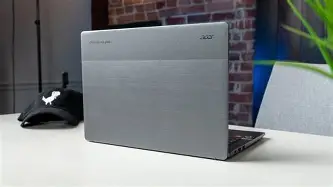
The chassis of the Plus 514 leans toward an understated, business-friendly look: thin bezels, a matte lid finish, and a sturdy hinge. For users who carry a laptop between home, campus, and cafés, the balance between weight and rigidity matters more than flashy aesthetics, and the Plus 514 prioritizes that balance. The keyboard deck typically resists flex, and the hinge provides enough tension for single-handed opening without wobble during typing.
Port placement on the Plus 514 generally focuses on practicality: a pair of USB-C ports, at least one USB-A, a microSD slot, and a headphone jack. While not exhaustive, this selection meets common needs for external displays, fast charging, and expandable storage without a dongle for most day-to-day tasks.
Display and multimedia
Display quality is one of the Plus 514’s most noticeable upgrades over budget Chromebooks. Typical configurations offer a 14-inch panel with sharper text and better color than the basic TN or low-end IPS screens found on cheaper models. For remote classes, document editing, web conferencing, and streaming video, the display is bright enough for indoor use and renders text crisply—important for extended reading or writing sessions.
Speakers on Chromebooks are rarely outstanding, and the Plus 514 follows that trend: audio is serviceable for video calls and casual music but lacks deep bass and stage. The webcam is adequate for daytime video calls but may struggle in low-light conditions. Buyers who frequently attend professional video meetings may want to budget for an external webcam or a well-lit workspace.
Keyboard, trackpad, and input
A comfortable keyboard is a hallmark of any laptop meant for productivity. The Plus 514 generally offers a responsive keyboard with decent travel and a predictable layout. The top-row function keys align with ChromeOS conventions—search, brightness, volume, and media controls—making common tasks faster. The trackpad is large, smooth, and supports ChromeOS multitouch gestures reliably, which helps when juggling multiple tabs and virtual desktops.
Performance and everyday use
One of the defining features of the Chromebook Plus designation is a higher-performance silicon option relative to base models. In practice, the Plus 514’s processors and memory configurations favor fluid multitasking: several dozen browser tabs, Google Docs, light image editing, and streaming can coexist without the severe slowdowns seen on low-end Chromebooks. However, ChromeOS performance remains constrained by the limitations of web-based workflows and Android apps. Heavy local workloads—large video editing projects or sustained compiling—are outside the platform’s sweet spot.
Looking for the best Laptops & Computers deals on Amazon?
See Deals →Configurations that include 8 GB of RAM or more are the best choice for users who keep many tabs or run Linux containers. Lower RAM options will work for simpler habits but may force more tab reloads and occasional lag when switching contexts.
Battery life
Battery life is a crucial consideration for mobile users, and the Plus 514 typically delivers solid endurance. Under mixed usage—web browsing, document work, and intermittent video calls—users can expect a full workday from a single charge in many configurations. Battery performance depends on panel brightness, background tasks, and whether Wi-Fi or Bluetooth peripherals are active. For travel days or long study sessions, the combination of efficient ChromeOS and a mid-sized battery usually keeps the laptop on the job without frequent charging breaks.
Ports, connectivity, and expandability
Modern Chromebooks balance thinness with practical connectivity. The Plus 514 generally provides:
- USB-C ports (power delivery and display output)
- At least one USB-A port for legacy accessories
- A microSD card slot for expanding local storage or moving files
- Wi‑Fi 6 and Bluetooth for faster wireless networking and peripherals (on select SKUs)
These options suit students and professionals who occasionally connect to wired peripherals or external monitors. For anyone relying on multiple wired accessories, a USB-C hub may still be necessary, but the inclusion of at least one USB-A keeps immediate compatibility for older devices.
Software, updates, and ecosystem
ChromeOS brings a different ownership model: the operating system receives regular updates and security patches from Google, and Acer’s Chromebook Plus series usually benefits from a longer update window than budget models. For buyers who prioritize device longevity and security, the Chromebook’s automatic update mechanism and verified boot offer a low-maintenance experience.
Additionally, the Plus 514 supports Android apps from the Google Play Store and, on many configurations, Linux applications. This flexibility extends the laptop’s capabilities beyond pure web apps—useful for light coding, Android-only entertainment apps, and simple local tools. Buyers who need legacy Windows software or niche desktop applications should recognize ChromeOS limitations and plan for cloud-based or web alternatives where possible.
Real-world use cases
The Acer Chromebook Plus 514 fits several common buyer profiles well:
Discover deals on Laptops & Computers — updated daily.
Shop Amazon →- Students: Lightweight, robust for note-taking, research, and cloud-based learning platforms. Long battery life supports lectures and study sessions without frequent charging.
- Remote workers: Reliable for email, video calls, document collaboration, and browser-based SaaS tools. The comfortable keyboard and solid trackpad support long typing sessions.
- Frequent travelers: The combination of a compact 14-inch form factor and decent battery life makes it suitable for flights and cafés, though users who require premium webcams or speakers may supplement externally.
- Light creators: Photo touching-up, simple video clipping, and Android creative apps run fine for casual creators, but the device is not designed for professional content production.
Pros & Cons
Pros
- Refined build quality: Sturdier chassis and better hinge compared with entry-level Chromebooks.
- Better display: A sharper, more color-accurate 14-inch panel than cheaper alternatives.
- Improved performance: Configurations with upgraded processors and 8 GB+ of RAM deliver smooth multitasking for typical ChromeOS workflows.
- Good battery life: Day-long battery under normal mixed use in many configurations.
- Practical port selection: A mix of USB-C and USB-A with a microSD slot reduces reliance on adapters for common tasks.
- ChromeOS advantages: Automatic updates, verified boot security, Android app support, and optional Linux compatibility.
Cons
- Limited by ChromeOS: Not suitable for users who need Windows/macOS-only apps or heavy local processing.
- Speakers and webcam: Audio and low-light webcam performance are average; external peripherals might be desirable for professional conferencing.
- Upgradability: Little in the way of internal upgrades—RAM and CPU are generally fixed at purchase.
- Storage constraints: Chromebooks commonly include modest internal storage; reliance on cloud storage is necessary for larger media libraries.
Comparison
The table below situates the Acer Chromebook Plus 514 against a pair of representative alternatives: a base-budget Chromebook and a higher-end premium Chromebook. These categories help potential buyers weigh which trade-offs matter most.
| Feature | Acer Chromebook Plus 514 | Typical Budget Chromebook | Premium Chromebook Alternative |
|---|---|---|---|
| Build quality | Solid, minimal flex; professional finish | Plastic chassis; more flex | Metal chassis; very premium |
| Display | 14" sharper IPS panel; better color | Lower-resolution TN/IPS; washed color | High-res, brighter panels with better color |
| Performance | Mid-tier; good for multitasking | Low-tier; basic web tasks only | High-tier; best-in-class responsiveness |
| Battery life | Typically full workday | Variable; sometimes shorter | Optimized; all-day plus with larger battery |
| Ports | USB-C, USB-A, microSD | Often fewer ports, may lack USB-A | More ports and Thunderbolt/USB4 on some |
| Price | Mid-range | Lowest cost | Premium price |
Buying guide: who should pick the Acer Chromebook Plus 514?
When evaluating the Plus 514, buyers should weigh their typical daily tasks, expectations for longevity, and peripheral needs. The following checklist helps decide whether this Chromebook aligns with those priorities.
Consider the Plus 514 if:
- Primary workflows are web-based: Heavy use of web apps, cloud-based productivity suites, streaming, and social or messaging services.
- Portability and battery matter: Regular commuting, classes, or travel where a reliable single-charge day is important.
- Value and build balance: A desire for a nicer display and sturdier build without paying flagship prices.
- Android or Linux apps are useful: Occasional use of Play Store apps or light Linux tools expands the device’s utility.
Look elsewhere if:
- Windows/macOS-only software is required: Native desktop applications like full Adobe Creative Cloud or professional accounting software demand other platforms.
- Serious local content creation: Large video editing projects, 3D rendering, or heavy compiling need more CPU/GPU power and storage.
- High-end media consumption is a priority: Audiophiles or video professionals will want better speakers and a higher-fidelity display.
Configuration tips
- Choose at least 8 GB RAM if multiple tabs and Linux containers are part of the workflow.
- Prioritize storage based on media habits: If local photo or video files are common, opt for a larger internal SSD or plan to use a microSD card and cloud storage.
- Check Wi‑Fi standard: Wi‑Fi 6 is a practical upgrade for faster, more reliable connections, especially on crowded networks.
- Consider teacher or enterprise needs: For school or corporate deployments, check that the update lifespan and management features meet institutional requirements.
Practical tips for buyers and owners
To get the most from the Plus 514, consider these pragmatic steps:
- Use cloud storage: ChromeOS is designed around online storage; enable automatic uploads and keep local storage for essential files.
- Manage extensions carefully: Browser extensions can consume RAM and battery—limit them to essentials for better performance.
- Take advantage of Linux support: For light development or specialized apps, enable the Linux container but allocate resources conservatively.
- Invest in accessories selectively: A USB-C hub, a privacy-cover for the webcam, or a portable USB microphone can significantly improve conferencing and connectivity without replacing the laptop.
Verdict and final thoughts
The Acer Chromebook Plus 514 is a compelling option for buyers who need more than the bare minimum from a Chromebook but do not require the expense or power of premium ultrabooks. Its strengths are in delivering a noticeably better display, a solid typing experience, and dependable battery life—qualities that matter most in daily academic and professional workflows. For web-centric users, students, and light creators, the Plus 514 represents an excellent balance of price and capability.
However, ChromeOS remains a limiting factor for those needing full-fat desktop applications or heavy compute. The Plus 514 should not be seen as a replacement for a Windows or macOS workstation in those cases. Instead, it is best considered as a focused, low-maintenance, and portable machine that excels at what Chromebooks are designed to do: fast, secure, and straightforward web-based computing.
In short, the Acer Chromebook Plus 514 is a practical, well-rounded choice for the majority of buyers who prioritize everyday productivity, portability, and a little extra polish over the cheapest options—just be mindful of the platform’s inherent constraints when making a final decision.